A polished 3D book mockup is the difference between a LinkedIn launch post that stops the scroll and one that gets buried in the feed. The right angle, the right background, and the right image dimensions can double your click-through rate before you write a single word of caption copy. This guide breaks down exactly what works on LinkedIn in 2026 — and how to get professional mockups without spending $300–$800 on a designer.
Why 3D Mockups Outperform Flat Cover Images on LinkedIn
LinkedIn's algorithm rewards native image posts that generate dwell time — the seconds someone pauses on your content before scrolling past. A flat, two-dimensional cover scan reads like a file attachment. A 3D rendered mockup reads like a real product launch.
The psychology is straightforward: a 3D mockup signals that this book physically exists. It's sitting on a desk. Someone could pick it up. That perceived tangibility drives engagement from the professional audience LinkedIn attracts — the exact readers who buy non-fiction business, leadership, and self-development books.
Accounts that lead their launch posts with photorealistic 3D mockups consistently outperform flat cover images in comment volume and profile visits. The visual does the first 80% of the work before anyone reads your headline.
The 5 Mockup Formats That Matter for a LinkedIn Launch
Not every mockup format fits every use case. Here's what each format does and when to use it in your LinkedIn launch sequence:
- Paperback standing upright: The workhorse. Clean, professional, instantly readable. Use this as your primary launch post image — it communicates "real book" faster than anything else.
- Hardcover angled at 30–45 degrees: The premium signal. If you're positioning your book as a flagship credential or authority piece, the hardcover format elevates perceived value. Use it in posts targeting C-suite or founder audiences.
- E-Reader / Kindle device mockup: Critical for authors with an ebook launch running in parallel. LinkedIn has a heavily mobile-reading audience. Show your book on a device and you're speaking directly to how they'll consume it.
- Standard boxset: Use this for social proof posts — "grab the full series" or "bundle available now." It signals volume and credibility. A single book looks like a debut. A boxset looks like a body of work.
- Course package boxset: The highest-converting format for coaches, consultants, and course creators. If your book is the entry point to a program or curriculum, this mockup visually communicates an ecosystem, not just a product.
Angles That Perform on LinkedIn: A Practical Breakdown
LinkedIn's feed renders images at a fixed width with varying height depending on aspect ratio. The angle of your 3D mockup determines how much of the cover text is legible at feed size — and legibility is everything.
The 3/4 front angle (most recommended): The book faces slightly toward the viewer, with the spine visible on one side. You see the full front cover clearly, plus the dimensional depth that makes it feel real. This angle maximizes cover readability at thumbnail size.
The straight-on front angle: Works when your cover has a single dominant visual element or very large title text. Avoid this if your cover is text-heavy or has a complex illustration — details get lost at LinkedIn's compressed image sizes.
The angled spine view: Best used as a secondary image in a carousel post, not the lead image. It creates variety and shows the book from a different perspective, but it sacrifices title readability as a standalone.
The floating / slight tilt: A 10–15 degree tilt with a soft shadow underneath suggests the book is mid-air or just placed down. It's dynamic without being distracting. Works especially well for the hardcover format.

Backgrounds and Lighting: What to Use, What to Skip
The background of your 3D mockup is doing more work than most authors realize. It sets the category signal before anyone reads your title.
White or near-white backgrounds: The safest choice for a LinkedIn feed where backgrounds vary wildly by post. A clean white background makes your book the undisputed focal point and photographs like a product listing. Use this for any post targeting a broad professional audience.
Dark/charcoal backgrounds: High contrast, premium feel. Strong for finance, executive leadership, or strategy books where authority is the positioning. The risk: dark backgrounds can cause the post image to blend into LinkedIn's dark mode interface on mobile.
Gradient backgrounds (blue-to-dark, gold-to-cream): These perform well for motivational, mindset, and personal development books. The gradient implies movement — appropriate for transformation-focused titles. Keep the gradient subtle; heavy gradients look dated.
Desk or lifestyle props: Coffee cup, notebook, glasses beside the book. This works in a caption-driven post where you're telling a personal story. It humanizes the visual. But avoid cluttered props that compete with the cover for attention.
What to skip entirely: Busy textures, heavily patterned backgrounds, and anything with competing text or brand watermarks behind the book. LinkedIn compresses images and busy backgrounds turn into visual noise.
The Right Image Sizes for LinkedIn in 2026
Posting the wrong dimensions means LinkedIn crops your mockup automatically — and the crop almost never lands where you'd choose. Use these specs to get the full image in-feed, every time.
- Single image post: 1200 × 627 pixels (1.91:1 ratio). The standard LinkedIn feed format. Your 3D mockup should be centered with padding on both sides — never edge-to-edge, or cropping happens on mobile.
- Square post (highest mobile engagement): 1080 × 1080 pixels (1:1 ratio). Square posts take up more vertical real estate in the mobile feed. If you're choosing one format for maximum scroll-stop, make it square.
- Portrait post: 1080 × 1350 pixels (4:5 ratio). The largest image LinkedIn renders without compression artifacts. Best for single-mockup hero posts when your cover is tall and visually detailed.
- Carousel posts: Each slide at 1080 × 1080 pixels. Use a carousel to show multiple mockup angles across 3–5 slides — paperback first, then hardcover, then boxset — building the launch narrative slide by slide.
- Resolution: Export at minimum 300 DPI. LinkedIn re-compresses uploaded images, so starting at high resolution means the final displayed image is still sharp. Low-resolution mockups look pixelated in the feed and immediately signal amateur production.
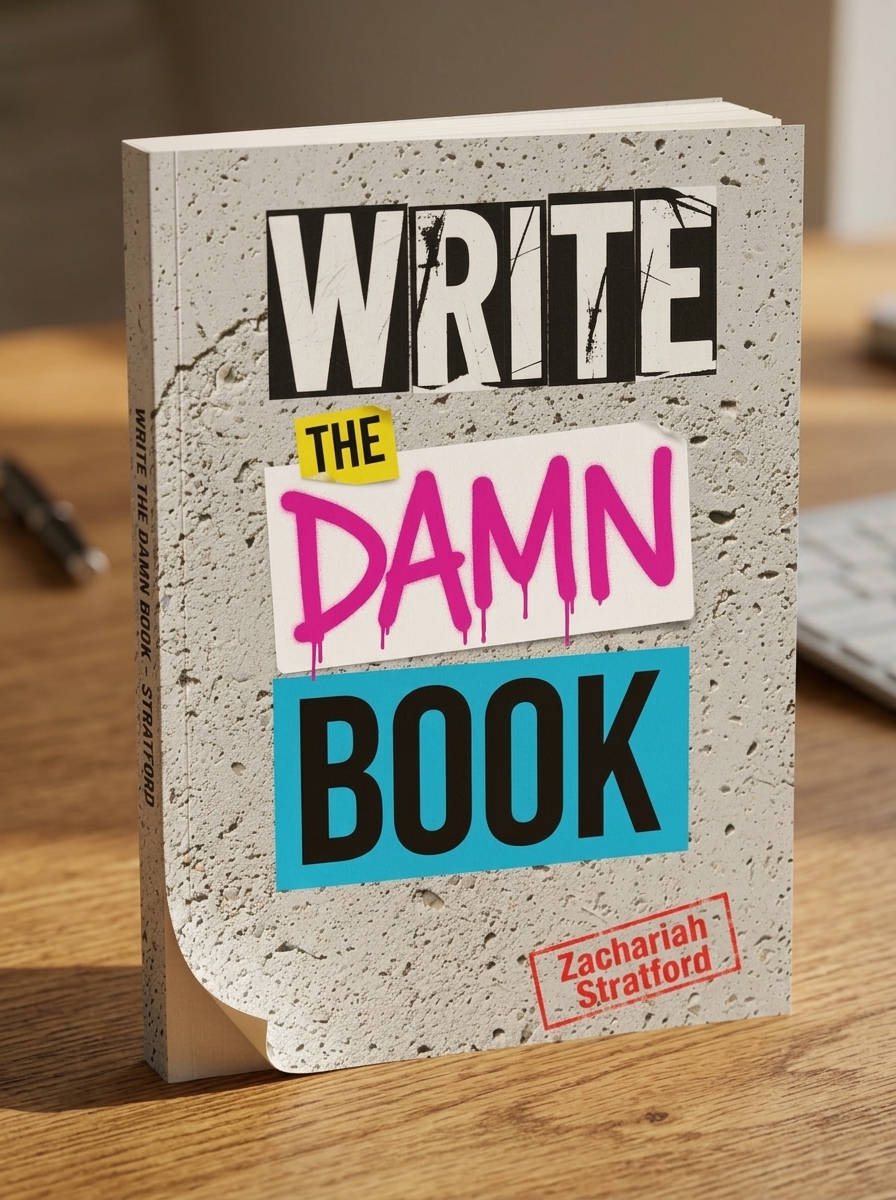
How to Create a 3D Book Mockup for LinkedIn in 5 Steps
- Have your finished cover ready. Your cover file is the input. No cover, no mockup. If you're still designing, complete the cover first.
- Choose your mockup format. For a primary launch post, start with the paperback or hardcover. Add the e-reader mockup if you're running an ebook campaign simultaneously.
- Select the angle. The 3/4 front angle is the highest-performing choice for LinkedIn readability at feed size.
- Pick your background. White for broad audiences. Dark for premium/authority positioning. Gradient for transformation/mindset categories.
- Export at the correct size. 1080 × 1080 pixels at 300 DPI for a square post. 1200 × 627 for a standard landscape post. Never let LinkedIn auto-crop your mockup by uploading an odd dimension.
How AuthorWizard Generates All 5 Mockups in Seconds
AuthorWizard's 3D Book Rendering Studio takes your finished cover and generates 5 photorealistic mockups: hardcover, paperback, e-reader/Kindle device, standard boxset, and course package boxset. All 5 render from a single cover upload. No design software. No Canva workarounds. No $300–$800 freelancer fee.
The renders come back ready for direct use across your LinkedIn posts, your book's landing page, your Amazon Author Page, and paid ad creatives — all from the same generation. At 300 DPI with photorealistic lighting and shadows, these look identical to what a professional product photographer would produce for a physical book shoot, without the $500+ photography session.
The 3D Rendering Studio sits inside AuthorWizard's end-to-end platform, which means your cover file flows directly from the Cover Designer into the mockup stage. You don't re-upload, reformat, or start over. The whole sequence — cover design to finished 3D mockups — happens inside one workflow.
Compare that to the alternative: hiring a freelance 3D mockup designer typically runs $300–$800 for a full set, takes 3–5 business days, and requires you to send revision notes back and forth over email if the angle or background isn't right. AuthorWizard generates the same output in seconds, included in the platform.

Putting It Together: Your LinkedIn Launch Post Sequence
A single mockup post is a launch moment. A sequence of mockup posts is a launch campaign. Here's how to structure it over a 7-day window:
- Day 1 — The reveal: Square post (1080 × 1080) with the paperback 3/4 front angle on a white background. Caption: the book's core premise in 3 sentences. This is your highest-reach post of the launch week.
- Day 3 — The carousel: 4-slide carousel showing paperback, hardcover, e-reader, and boxset mockups. Each slide gets one sentence caption: format, price point, where to buy, one reader transformation. Carousels get significantly higher dwell time than single images.
- Day 5 — The authority post: Hardcover mockup on a dark background, portrait format (1080 × 1350). Caption: your credentials, the reader problem you wrote the book to solve, and the direct link to purchase. This targets LinkedIn's professional audience explicitly.
- Day 7 — The course/bundle push: Course package boxset mockup. Caption: the ecosystem around the book — your program, your coaching, your community. This converts readers into clients, not just book buyers.
Each post uses a different mockup format, a different background, and a different image dimension. Together, they cover every format and every reader type in your LinkedIn audience — without repeating the same visual four times and burning out your feed presence before launch week is over.
Get 5 Photorealistic 3D Book Mockups — Instantly
Hardcover, paperback, e-reader, boxset, course boxset — AuthorWizard generates all 5 in seconds from your cover. Ready to drop into your ads, landing page, and Amazon author page.
Try the 3D Mockup Studio Free →