The wrong book mockup in an Amazon Sponsored Brands ad doesn't just underperform — it actively costs you money. You're paying per click, so a weak image means you're funding impressions that never convert. The short answer: a photorealistic 3D hardcover or paperback mockup on a clean background consistently outperforms flat cover JPGs, lifestyle shots, and abstract graphics in Amazon's Sponsored Brands placement. But the format is only half the story. The angle, shadow depth, and whether the title is legible at thumbnail size matter just as much. Here's exactly what works, why it works, and how to create it without spending $300–$800 on a mockup designer.
Why Amazon Sponsored Brands Ads Demand a Different Strategy Than Social
Amazon shoppers are in purchase mode. They're not scrolling passively — they've already typed a keyword. That changes everything about what your ad image needs to do.
On Instagram, a moody lifestyle shot of your book sitting next to a coffee cup can work because you're interrupting someone's scroll and selling a feeling. On Amazon, that same image fails. The shopper is comparing five results at once, and your ad has roughly 1.5 seconds to communicate: this is a real, professional book, and it solves my problem.
Flat cover images — the same JPG you upload to KDP — don't convey that. They look like a screenshot. A 3D rendered mockup, by contrast, triggers a psychological shortcut: it looks like a physical product. That perception of tangibility correlates directly with purchase intent, especially for non-fiction where credibility is everything.
Amazon's own creative guidelines for Sponsored Brands reinforce this. They recommend images that feature the product prominently, show it in context, and use high resolution (minimum 72 DPI for display, though 300 DPI gives you room to crop without degrading quality). A photorealistic 3D mockup satisfies all three requirements.
The 5 Mockup Formats — and Which One to Use Where
Not all 3D mockup styles perform equally across Amazon ad placements. Here's a breakdown of the five main formats and their ideal use cases:
- Paperback mockup (angled, single book): The most versatile. Works in every Sponsored Brands position. The slight angle shows the spine, which makes it look more dimensional and real. Best default choice.
- Hardcover mockup: Signals premium positioning. If your book is priced above $24.99 or you're targeting a professional or executive audience, a hardcover mockup immediately elevates perceived value. Use this when you want buyers to feel they're investing, not just buying.
- E-reader/Kindle device mockup: Use this specifically when running ads for your Kindle edition. It removes confusion — the reader sees a device, understands this is digital, and knows the price point to expect. Mixing formats (showing a hardcover when advertising a Kindle edition) creates cognitive friction.
- Standard boxset mockup: Powerful for series authors or bundled offers. A boxset visual communicates volume and value instantly. If you have a Sponsored Brands campaign promoting a series, this is your headline image.
- Course package boxset mockup: Ideal if your book is the anchor for a coaching program, online course, or companion workbook bundle. It signals a complete system, not just a single read — and that framing supports higher price points.
For most non-fiction authors running their first Sponsored Brands campaign, start with the angled paperback. It's universally readable, performs across devices (desktop and mobile), and gives Amazon's algorithm the clearest possible signal about what you're selling.

The Technical Specs That Actually Matter
Amazon Sponsored Brands has strict image requirements, and most DIY mockups fail at the technical level before they even get to creative performance.
Here's what Amazon requires and what you should target:
- Minimum image size: 1200 × 628 pixels for custom image ads
- File format: JPG or PNG
- File size: Under 5MB
- Background: White or very light neutral — Amazon's interface is white, so busy backgrounds compete with their UI and reduce click-through rate
- Text on image: Minimal. The book title reads naturally as part of the cover — no extra headline text overlaid on the mockup itself
- Resolution source: Generate from a 300 DPI source file so you can export at any size without pixelation
The most common mistake authors make is exporting from a small source image, upscaling it, and ending up with a blurry mockup. Amazon's algorithm may not penalize you for it directly, but shoppers notice. A blurry cover in an ad communicates one thing: this book wasn't made carefully. That's the last association you want.
What Photorealistic Actually Means — and Why Flat Mockups Can't Compete
There's a meaningful difference between a mockup template (a flat layer comp in Photoshop) and a true 3D photorealistic render. The difference is light.
A photorealistic 3D mockup has a real light source. Shadows fall correctly. The spine curves slightly. The pages have texture. The surface reflects ambient light the way a physical book would on a desk. That level of realism isn't cosmetic — it produces a measurably different emotional response in the viewer. The brain processes it as a real object, not a digital asset.
Flat layer templates — the kind you find on Canva or Freepik — paste your cover onto a pre-drawn outline. The lighting doesn't match. The shadow is generic. Experienced Amazon shoppers have seen thousands of book listings, and the flat mockup reads as low-effort. The 3D render reads as professional.
If you're spending money on Sponsored Brands clicks, you cannot afford to hand that difference to a competitor who used a better mockup.
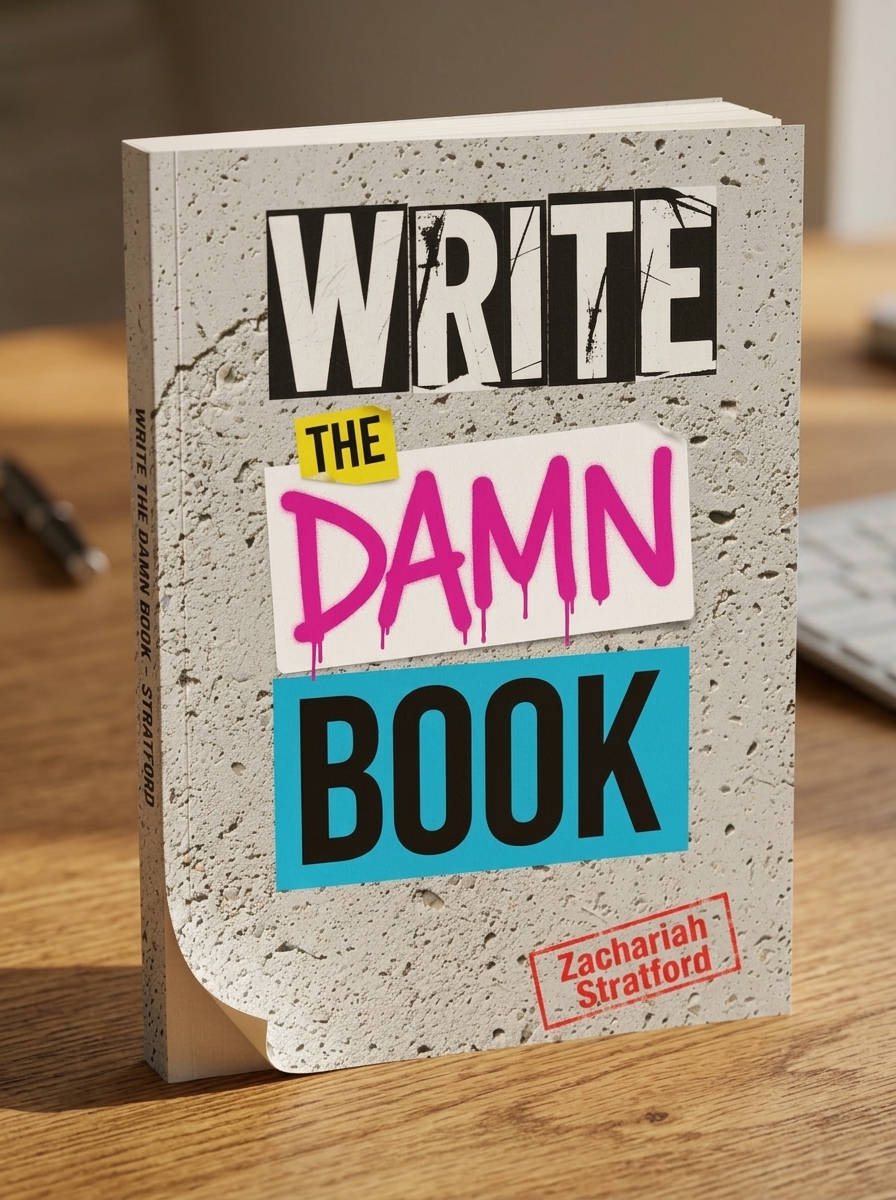
How to Choose the Right Book Mockup for Amazon Sponsored Brands Ads
- Match the mockup format to the edition you're advertising. Paperback or hardcover for print, e-reader device for Kindle — never mix them.
- Use a photorealistic 3D render, not a flat template. 3D renders have accurate light, shadow, and depth. Flat templates look amateurish next to professional listings.
- Export from a 300 DPI source. Scale down for Amazon's 1200 × 628 minimum, never up from a small file.
- Use a white or near-white background. Amazon's interface is white — busy backgrounds create visual competition, not contrast.
- Keep the cover title legible at thumbnail size. If you can't read the title when the image is shrunk to 200px wide, the mockup will not work in mobile ad placements.
- Test the angled paperback first. It's the highest-performing default format for non-fiction Sponsored Brands ads. Move to hardcover or boxset formats once you have baseline click-through data.
- Generate multiple formats in one session. Use the same creative refresh to test hardcover vs. paperback in an A/B split without redesigning anything.
How AuthorWizard Generates All 5 Mockup Formats From a Single Cover File
This is where most authors lose an entire afternoon. Creating professional 3D mockups traditionally means either hiring a designer ($300–$800 for a set), buying a 3D software subscription and learning Blender, or stitching together free templates that never quite look right.
AuthorWizard's 3D Book Rendering Studio eliminates all of that. Once your cover is designed inside the platform — or uploaded if you already have one — the system generates all 5 photorealistic 3D renderings from that single file:
- Hardcover
- Paperback
- E-Reader/Kindle device mockup
- Standard boxset
- Course package boxset
Every rendering is built for immediate use in ads, landing pages, your Amazon author page, and social media. No Photoshop. No prompting. No sourcing templates. You get all 5 formats in seconds, not hours — and the source covers are already at 300 DPI from the Cover Designer, so the renders are export-ready without any upscaling.
This matters specifically for Amazon advertising because you need multiple formats. You'll want the paperback for your main Sponsored Brands campaign, the Kindle device mockup for your KDP eBook campaign, and the boxset for any series or bundle promotion. Generating all of them from one session means your ad creative stays visually consistent across every placement — same lighting, same angles, same professional quality. That consistency builds brand recognition across sessions, which compounds over time as your Amazon advertising matures.
The 3D Mockup Studio is Stage 8 inside AuthorWizard — it sits right after the Author Photo Studio and flows directly into the Static Ad Generator and Video Studio, so the same cover image threads through every piece of ad creative you produce. You're not re-uploading files or reformatting assets between tools. The pipeline handles it.

One More Thing: Thumbnail Testing Before You Spend a Dollar
Before you upload any mockup to Amazon's campaign manager, run a simple 10-second test. Shrink the image to 150 pixels wide on your screen. Can you read the title? Can you identify the format (book vs. device)? Does the cover still look professional at that size?
Amazon mobile placements render Sponsored Brands images small. Most of your impressions will be mobile. A mockup that looks stunning at full size but loses its title legibility at 150px will cost you clicks on every mobile impression — and mobile is where the majority of Amazon book purchases happen in 2026.
If the title disappears at thumbnail size, the fix is usually contrast. Dark text on a light cover reads at small sizes. Light text on a medium-tone cover disappears. This is a cover design decision, not a mockup decision — which is why AuthorWizard's Cover Designer runs a Market Intelligence pass first, analyzing up to 6 real bestselling covers in your category before you finalize your design. Thumbnail legibility is baked into the process, not an afterthought.
Get 5 Photorealistic 3D Book Mockups — Instantly
Hardcover, paperback, e-reader, boxset, course boxset — AuthorWizard generates all 5 in seconds from your cover. Ready to drop into your ads, landing page, and Amazon author page.
Try the 3D Mockup Studio Free →